


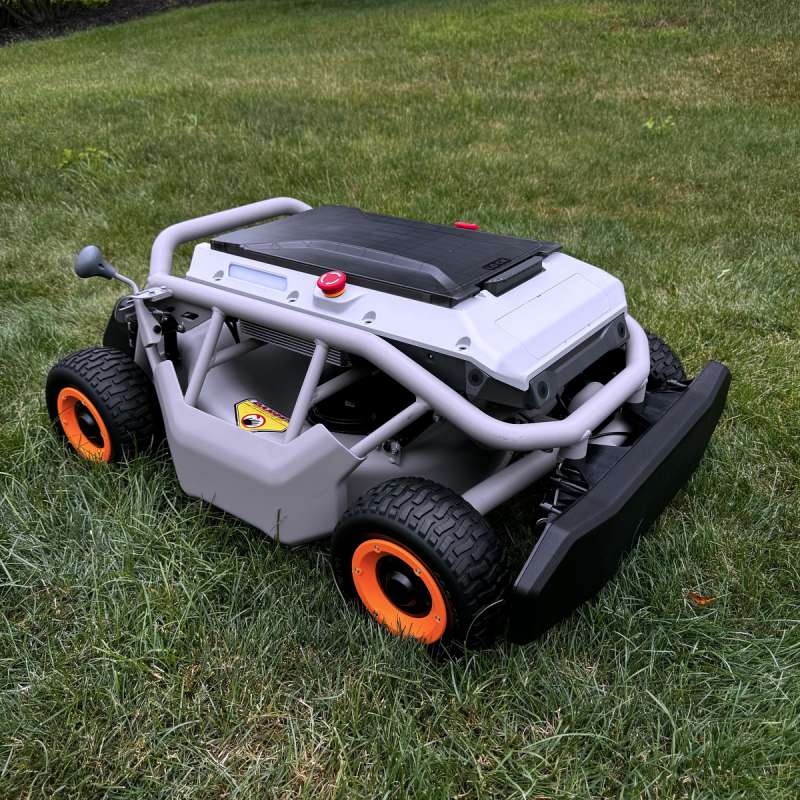
Remote control lawn mowers have revolutionized the way we maintain our lawns, offering convenience, efficiency, and precision. Whether you’re a seasoned homeowner or new to the world of remote-controlled lawn care, understanding how to maintain and operate your remote control lawn mower is essential to ensure it performs at its best for years to come. In this guide, we’ll walk you through everything you need to know about maintaining and operating your remote control lawn mower.
Understanding Your Remote Control Lawn Mower
Before diving into the maintenance and operational tips, it’s important to first understand how your remote control lawn mower works. These mowers are typically powered by either lithium-ion batteries or gas engines, and they are equipped with sensors, motors, and a wireless remote system that allows you to control the mower from a distance. They are designed to navigate your lawn autonomously or manually with the push of a button.
Key Features to Familiarize Yourself With
- Remote Control System: Usually, a handheld controller or app on your smartphone can be used to direct the mower’s movements.
- Sensors and Obstacles: These mowers are often equipped with sensors that detect obstacles or changes in terrain, ensuring the mower avoids accidents and maintains a smooth cutting pattern.
- Battery/Power Supply: Depending on your model, it may run on rechargeable batteries, making it crucial to know how long they last and how to charge them efficiently.
Operating Your Remote Control Lawn Mower
Operating your remote control lawn mower is relatively straightforward, but there are a few key steps and tips that will help you get the most out of it.
Step 1: Preparing the Lawn
Before operating your remote control lawn mower, prepare the lawn by:
- Clearing Obstacles: Remove any large branches, rocks, toys, or debris that could interfere with the mower’s path.
- Mowing the Edges: If your lawn has tall grass or overgrown edges, consider trimming them with a traditional mower or trimmer first to ensure your remote mower can work efficiently.
Step 2: Charging the Battery
Ensure that the battery is fully charged before each mowing session. Some models may have a base station where the mower automatically returns to charge when needed. Check the battery life indicator to ensure it has enough power to cover your entire lawn.
Step 3: Using the Remote Control
Most remote control lawn mowers come with intuitive remotes or smartphone apps. To begin mowing:
- Power on the Mower: Turn on your mower either via the remote or by manually activating the power button on the mower itself.
- Start Moving: Use the joystick or directional controls to guide the mower across your lawn. Some models have preset paths or zones that allow you to let the mower navigate autonomously.
Step 4: Monitoring and Adjusting
While your remote mower is doing its job, it’s important to keep an eye on its performance. You can adjust the cutting height or speed if necessary. Some models also have sensors to alert you if there are any problems, like a stuck wheel or an obstruction.
Maintaining Your Remote Control Lawn Mower
Proper maintenance is key to extending the lifespan of your remote control lawn mower and ensuring it runs at peak performance. Here are the essential maintenance tasks you should perform regularly.
1. Cleaning the Mower
After each use, it’s crucial to clean your mower to prevent grass buildup and dirt accumulation. Here’s how to do it:
- Turn off the Mower: Always power off the mower before cleaning.
- Brush Off Debris: Use a soft brush to remove any grass clippings or dirt from the mower’s underside, wheels, and sensors.
- Rinse (If Applicable): If your mower is waterproof, you may be able to rinse it with water to remove stubborn clippings.
2. Checking the Blades
The cutting blades are the most important component of your mower. They should be sharp and in good condition to ensure a clean cut. Here’s what you should do:
- Inspect the Blades: Check for signs of wear and tear, such as dullness or chips.
- Sharpen or Replace the Blades: If the blades are dull or damaged, sharpen them using a sharpening tool or replace them with new ones.
3. Battery Maintenance
The battery is another key component of your mower’s performance. To keep it in optimal condition:
- Charge Regularly: Ensure you charge the battery after each use to avoid it running low.
- Store Properly: If you’re storing the mower for an extended period, remove the battery and store it in a cool, dry place.
4. Software and Firmware Updates
Some remote control lawn mowers come with software or firmware that needs to be updated periodically. These updates can improve the mower’s performance or add new features. Check the manufacturer’s website for instructions on how to update your mower’s software.
5. Wheel and Motor Maintenance
Regularly check the wheels for any blockages or wear. If the mower is not moving smoothly, it may be a sign that the wheels need attention. Similarly, inspect the motors and ensure they are functioning correctly.
Troubleshooting Common Issues
While remote control lawn mowers are designed to be user-friendly, there may be times when you encounter issues. Here are some common problems and solutions:
- Mower Won’t Start: Check if the battery is fully charged. If it is, ensure the safety switch is in the “on” position.
- Mower Isn’t Moving: Inspect the wheels for any debris or obstructions. If the wheels are clean, check if the motor is working properly.
- Cutting Performance Is Poor: Ensure the blades are sharp and free of any grass build-up. You may also need to adjust the cutting height.
Conclusion
With proper care and operation, a remote control lawn mower can provide years of hassle-free lawn maintenance. By following this complete guide to maintaining and operating your remote control lawn mower, you’ll be able to keep your mower in top shape and enjoy a beautifully manicured lawn with minimal effort. Regular maintenance, correct usage, and troubleshooting common issues will ensure that your remote mower remains an invaluable tool in your gardening arsenal.
